Band leaders · TouringFor touring acts
Import flights and see them all
Drop in the travel agent's itinerary and every flight lands on the tour with seats and bags, after you check it. Or type a flight number and the rest fills in.
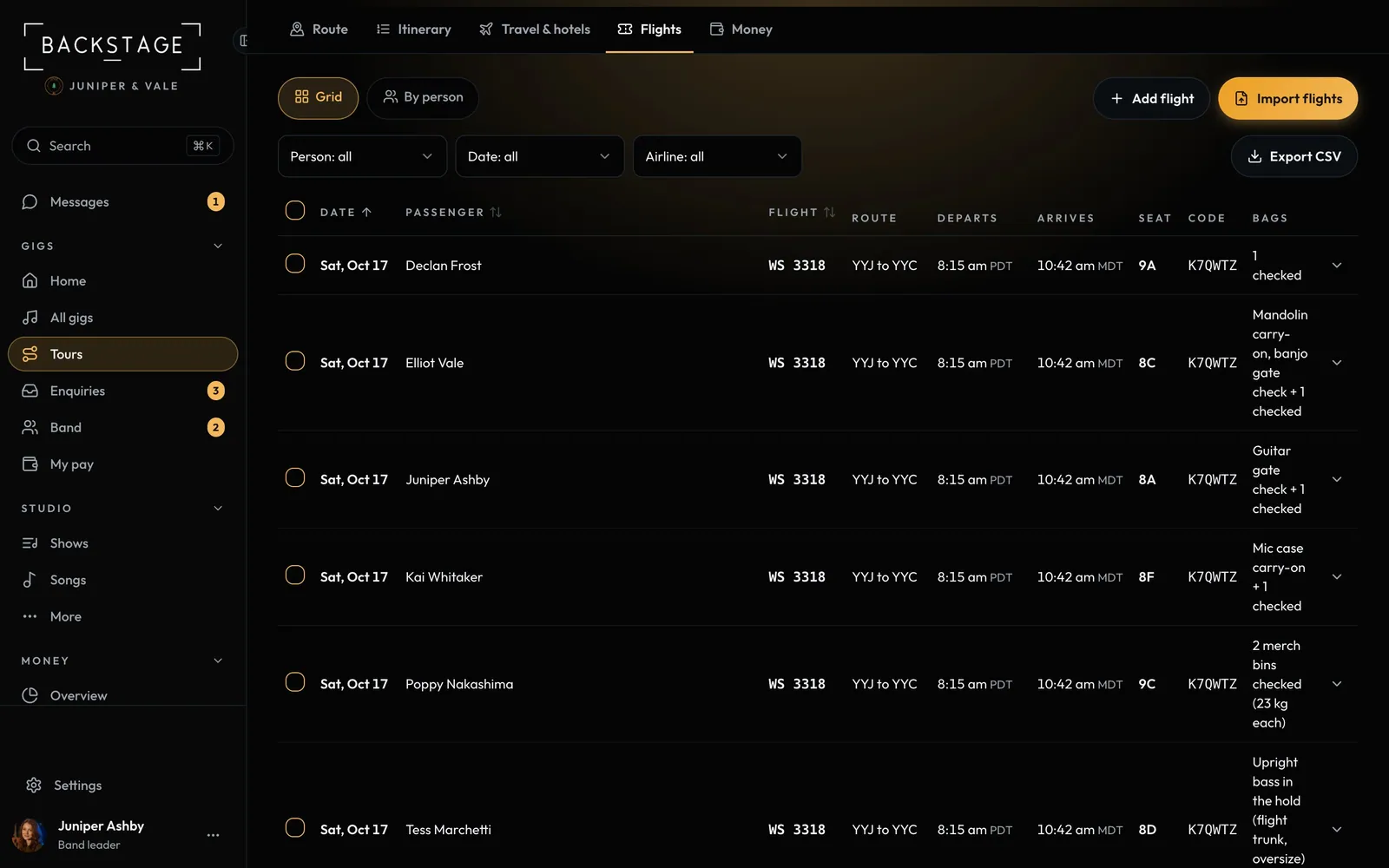
Swipe sideways to see the whole screen. Tap a number for its tip.
- Find a flightAirline, number and date fill the rest.
- Import flightsPDFs, emails, screenshots or photos. You review before saving.
- ExportPick the columns for the travel agent or the promoter.
How to
- Open a tour and choose Flights.
- Click Import flights, add the itineraries (PDF, .eml, screenshots or photos) or paste the email, and click Read.
- Check each flight. Passengers are matched to the band; pick who a guest is, keep them as a guest, or leave them off.
- Click Save. A flight already on the tour gets the new people and seats instead of a copy.
- To add one flight, click Add flight, enter the airline, number and date, and click Find flight. Add a connection for the next leg.
Tips
Tip
Filter the grid by person, date or airline, tick rows, and Export CSV with just the columns you need.Tip
Flight search and itinerary import are on Band Pro with Touring.