Band leaders · The gig
The venue's spec
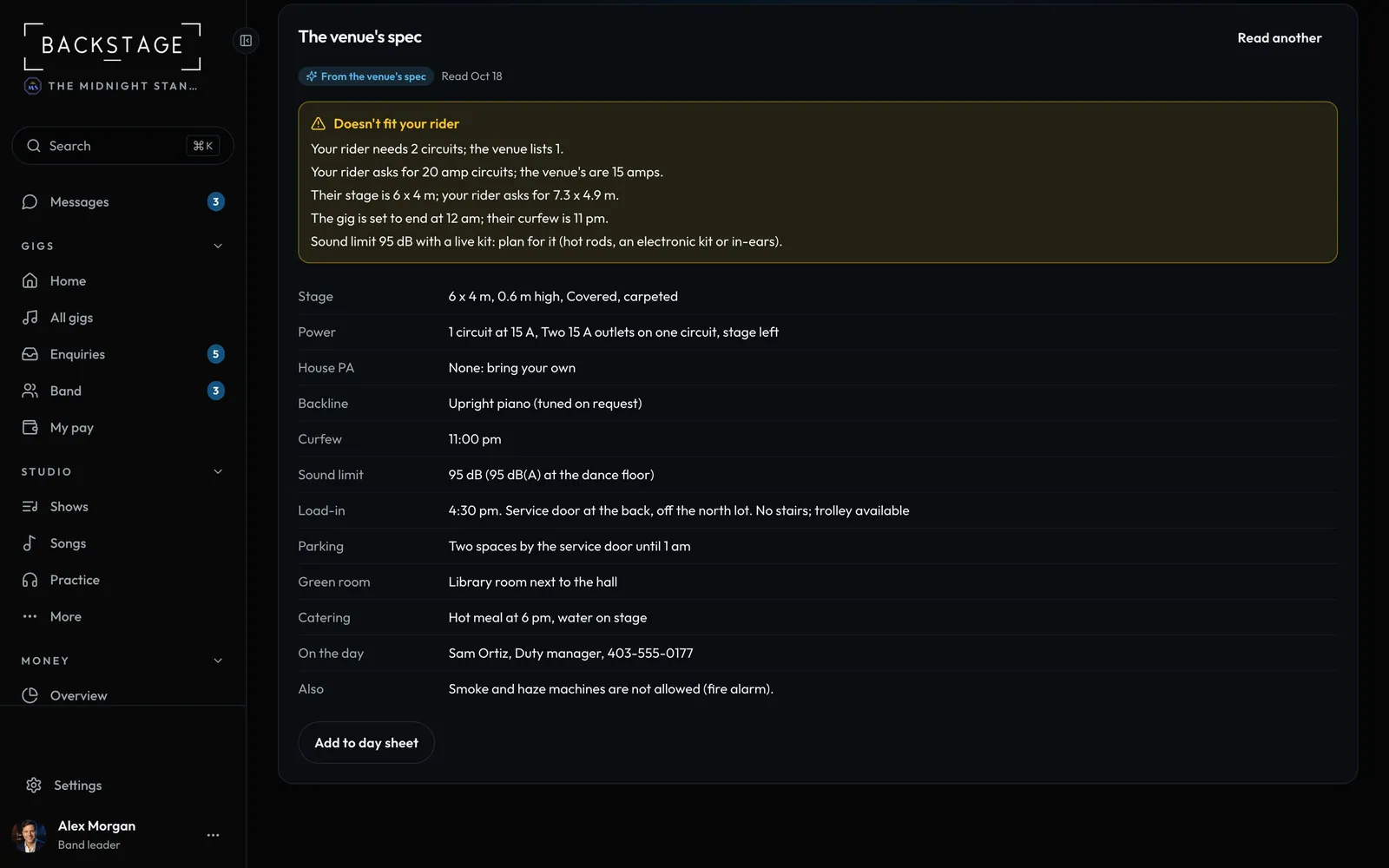
Add the venue's tech or production sheet. You get the stage, power, PA, curfew, sound limit and load-in in one place, checked against your stage plot so a clash shows before the night.
Swipe sideways to see the whole screen. Tap a number for its tip.
- Clashes firstPower, channels, stage size, curfew, sound limit.
- Add to day sheetTick what everyone on the gig should see.
How to
- Open the gig's Stage plot section (or Details). On a tour, it's on the show's day sheet.
- On The venue's spec, add the PDF or a photo, or paste the text.
- See the stage, power, house PA and desk, monitors, backline, curfew, sound limit, load-in, parking, green room, catering and the contact on the day.
- Doesn't fit your rider lists what clashes with your stage plot: one circuit when you need two, fewer channels, a curfew before your end time, a low sound limit with a live kit.
- Add to day sheet: tick what to copy. It goes in the gig's On the night details and notes, and the contact joins the gig's contacts.
Tip
Tip
Your stage plot itself is never changed. Stage sizes in feet are turned into metres.