DJs · Desktop or iPad
Build the crate
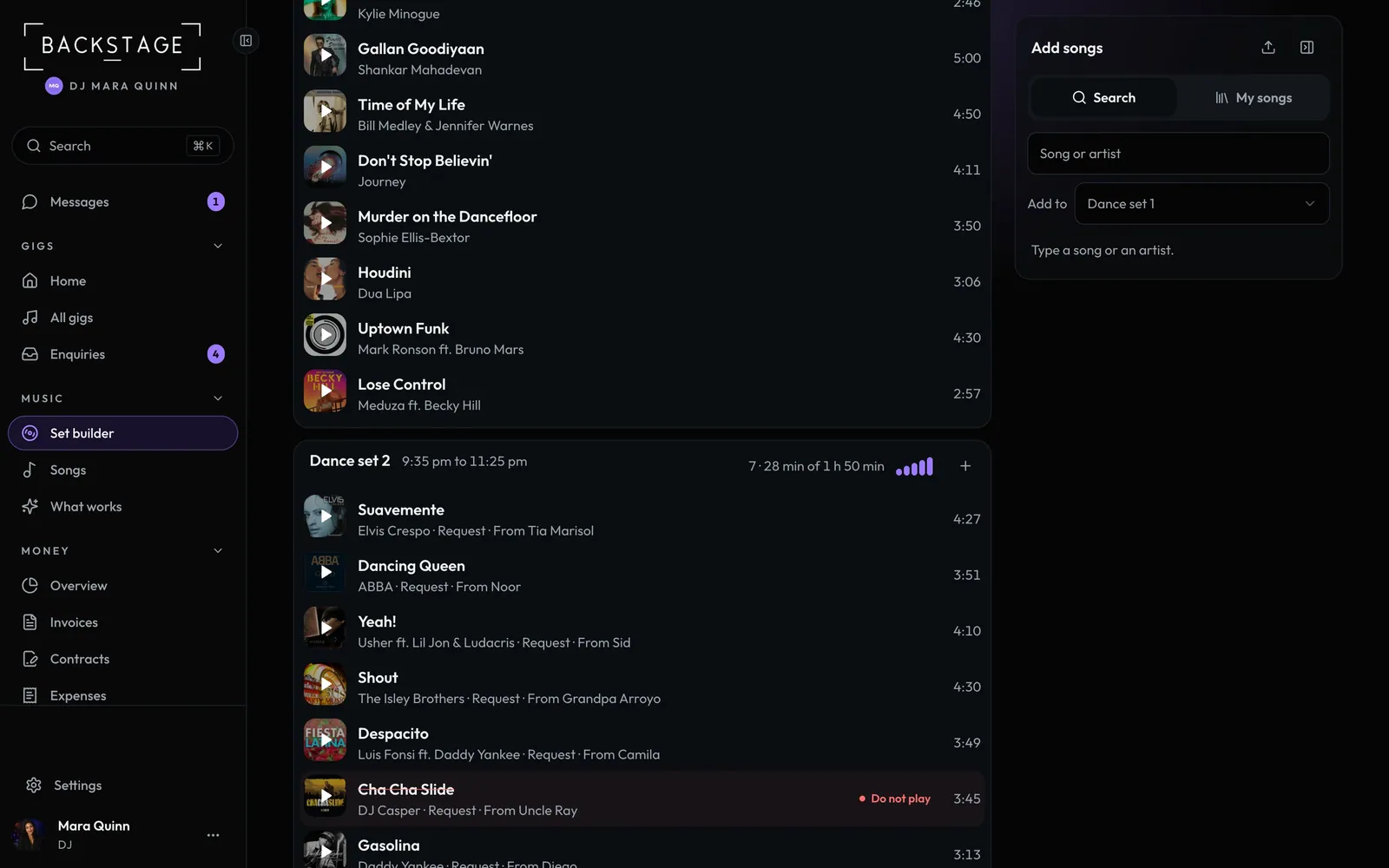
Every song for the night in one list, grouped by the night plan. Must-plays, moment songs and guest requests come in on their own. You add your picks, and anything on the do-not-play list is flagged. One line on top says what needs a look.
Swipe sideways to see the whole screen. Tap a number for its tip.
- Add your picksSearch, or from your own songs.
- BlocksSongs and length against the time you have.
- Where it came fromMust-play, moment or request. Your own picks just show the artist.
- Do not playOn the client's list. Struck through.
How to
- Open Music → Set builder, pick the gig and open Set builder.
- Tap Add songs (beside the songs on a wide screen, or + on a block). Search a song or open My songs, choose a block under Add to and tap +.
- Drag songs to reorder, or into another block. Tap a song for its version, note and block, or the artwork for a 30 second preview.
- Open Check the night for the energy curve and anything that needs a look. Turn on Flag explicit songs there for a clean event.
- On the night, tap the circle when a song is played (any other day, tap the song and Mark played).
Tip
Tip
Length, explicit flags and previews are looked up for you. BPM and key show when they're set on a song: there's no reliable free source to fill them in.