Band leaders · Settings
Your public profile
Your band's page on Backstage Live: bio, photos, videos, songs and reviews from real bookings. List it in the marketplace, or just share the link. Prices never show.
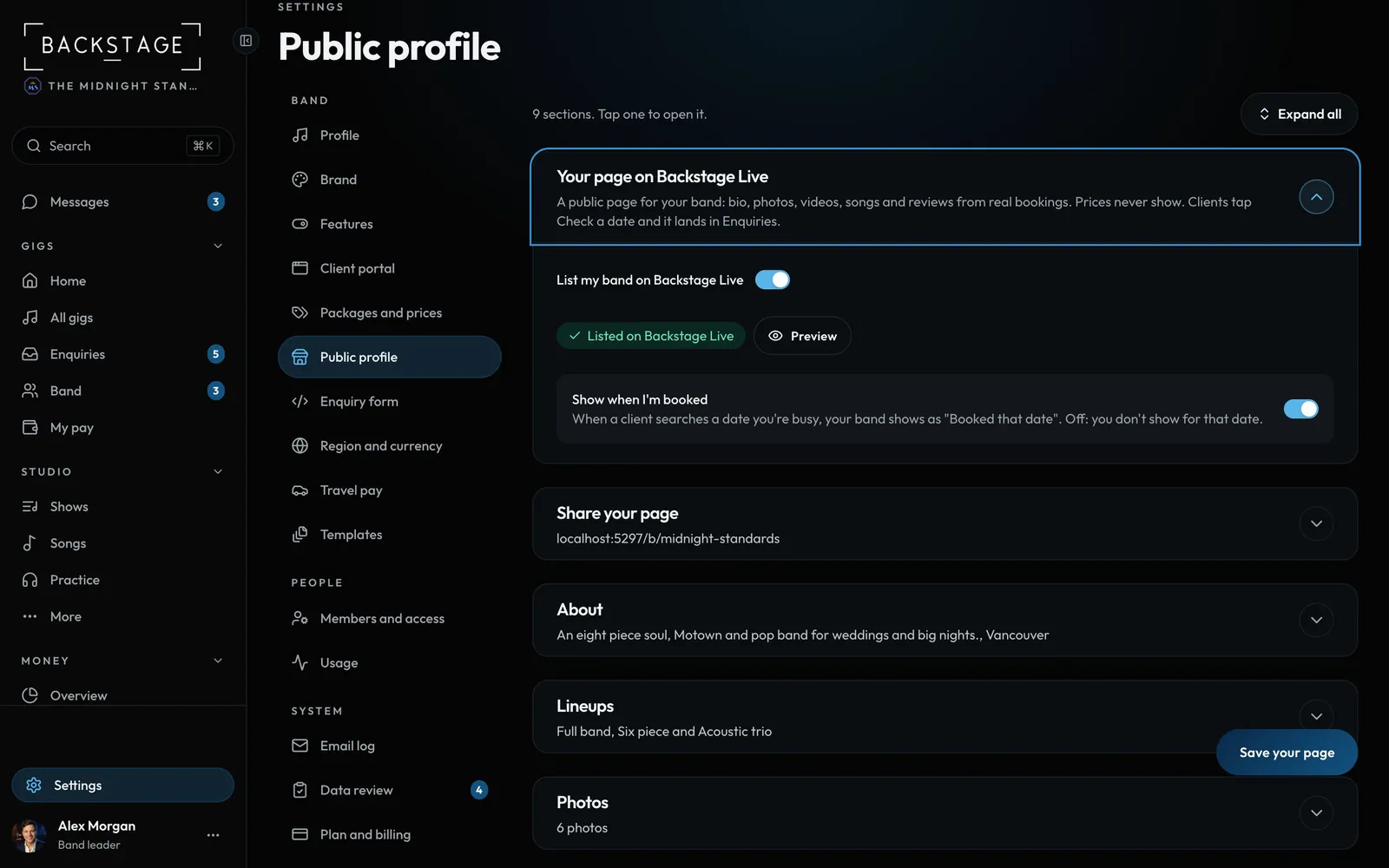
Swipe sideways to see the whole screen. Tap a number for its tip.
- List my bandOn: you show up in searches.
- PreviewSee the page before you save.
- Show when I'm bookedOff: you don't show on dates you're busy.
- ShareLink, QR code and a badge for your website.
How to
- Open Settings → Public profile. Each part is a row: tap it to open.
- Add a bio, your city and a photo. With your band's name, that's all a page needs to go live.
- Photos: a cover photo and up to 8 more. Any phone photo works, HEIC too. It's made small on your phone before it uploads.
- Add lineups (names and sizes), videos, songs marked Ready in Setlist Studio, and your links.
- Tap Save your page, then switch on List my band on Backstage Live. The line under it says Listed, or what's still missing.
- Under Reviews, hide any review you don't want shown. You can't change what a client wrote.
Tips
Tip
Your act type, styles, event types and lineup sizes decide which searches you show up in.Tip
Players: My settings → Sub work, switch on Let bands find me for sub work. Bands on Band Pro and up can then ask you to play, inside Backstage only. Their asks land under Requests.