Band leaders · iPad
Guest requests on the night
Guests scan your request QR and ask for songs. On an iPad held sideways or a computer, the requests sit beside the stage as they come in, and one tap lines a song up as Next up.
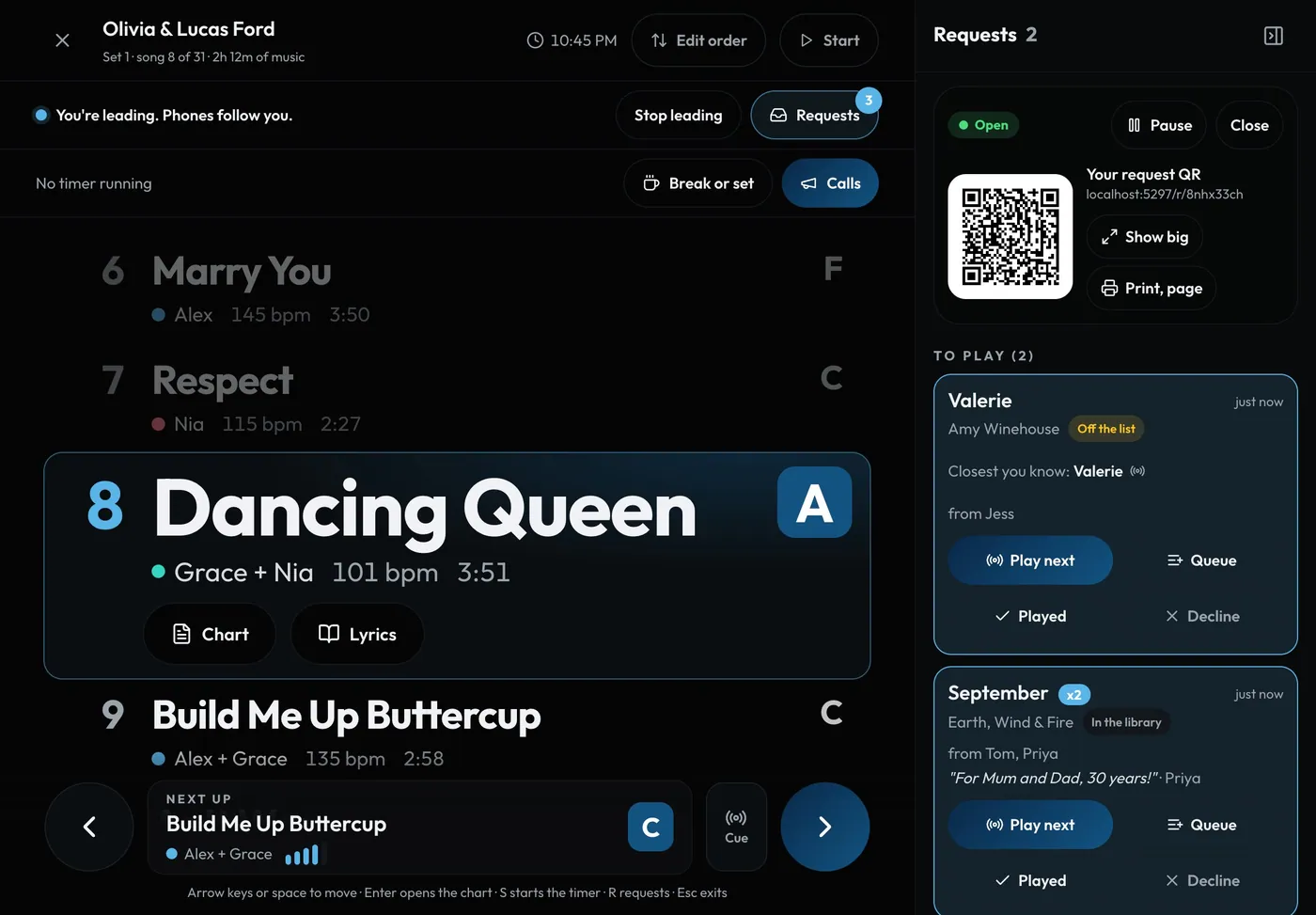
Swipe sideways to see the whole screen. Tap a number for its tip.
- Pause or closeRequests open by themselves when you lead the show.
- Your request QRThe same code every night. Tap it to show it big.
- A requestNewest first. The same song from several guests is one row, with a count.
- Play nextLines it up as Next up for everyone.
How to
- Lead the show in stage view (or Go live). Requests open by themselves, and close when you stop. Settings > Profile > Song requests can turn either off.
- On an iPad held sideways or a computer, the requests sit beside the stage. Press R, or the Requests button, to hide or show them. The choice is remembered on that device.
- On a phone or an iPad held upright, tap the small badge above the controls (it shows how many are new). The requests open in a drawer.
- Each request shows the song, a tag (In tonight's set, In the library or Off the list), who asked, any dedication and how long ago. New ones glow for a few seconds. There's no sound.
- The same song from several guests is one row with a count, like x3. Your answer goes for all of them.
- Tap Play next to line it up as Next up, Queue to keep it for later, Played once it's done, or Decline. Played and declined ones go under Done, where Undo brings one back.
- At the top: Pause (guests see "Back in a few minutes"), Resume, Close or Open requests, and your QR. Show big fills the screen with it to hold up for the room.
Tips
Tip
A song a guest types instead of picking is matched to your Ready songs, typos and all. If you don't know it, an Off the list request can show Closest you know: the nearest song you do play. Tap it to play that next. (With AI help on.)Tip
Only people who can edit setlists see requests. Everyone else just sees the show.Tip
Print, page beside the QR has the downloads, and tonight's request page: the welcome guests see for this gig.