Band leaders · Gigs
Import gigs from a spreadsheet
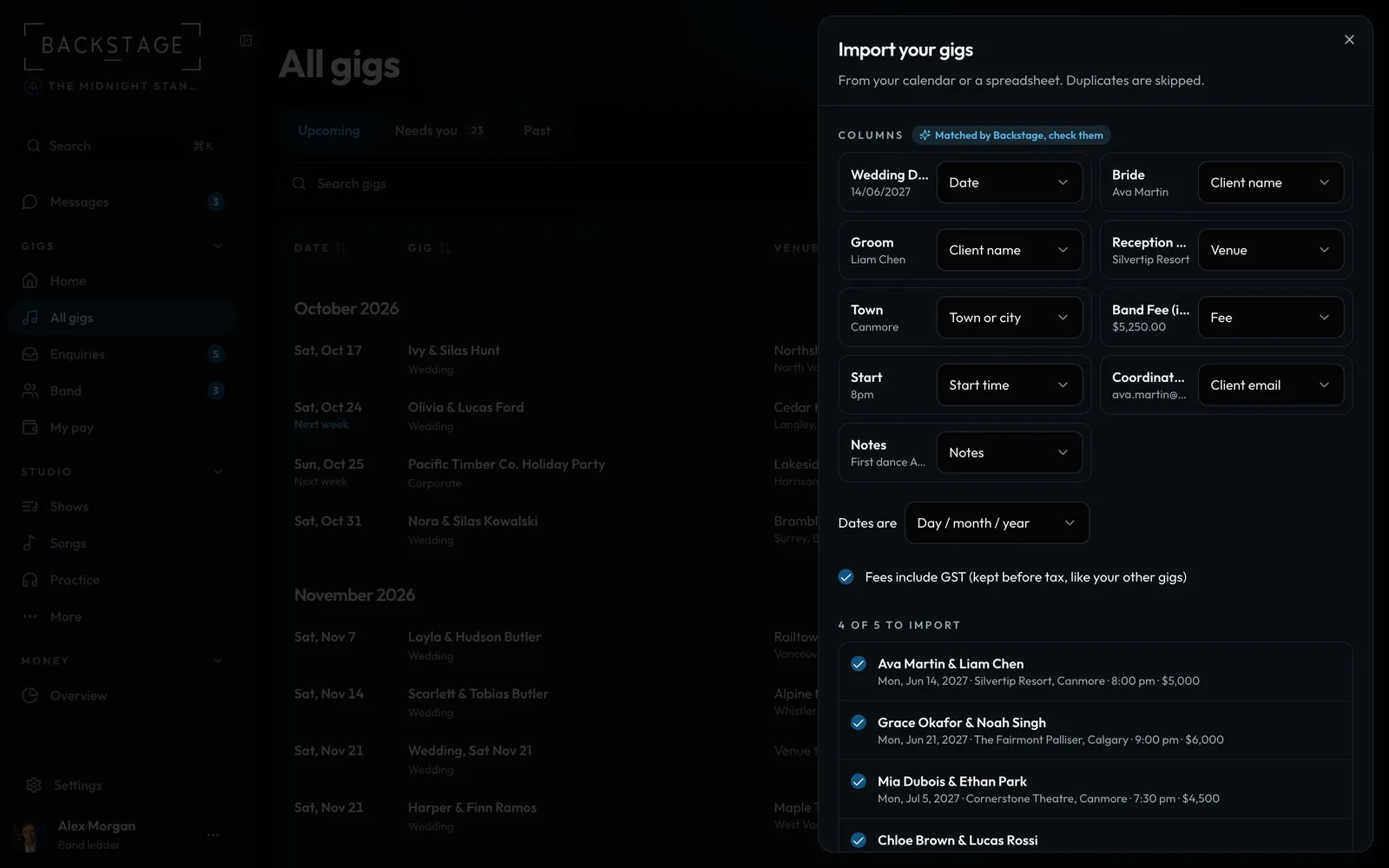
Bring your old spreadsheet in, whatever the columns are called. Date, Venue, Bride, Groom, Fee incl GST: each column is matched to the right field, and you check it before anything is added.
Swipe sideways to see the whole screen. Tap a number for its tip.
- Columns matchedChange any field it picked.
- How dates are writtenDay first or month first, checked against your data.
- Rows to importGigs you already have are unticked.
How to
- Open All gigs, then ... → Import gigs. It's in first-run setup too.
- Upload an Excel or CSV file, or paste cells straight from a spreadsheet.
- Check how each column is matched, how dates are written and whether fees include tax.
- Untick anything you don't want, then Import. Bride and Groom become the client, like "Ava Martin & Liam Chen".
Tip
Tip
Columns with clear names are matched without AI. Only the column names and a few rows are read to match the rest.