Everyone · iPad
Stage mode
Big, glanceable running order for the gig itself. When one person leads, every phone and iPad follows along live.
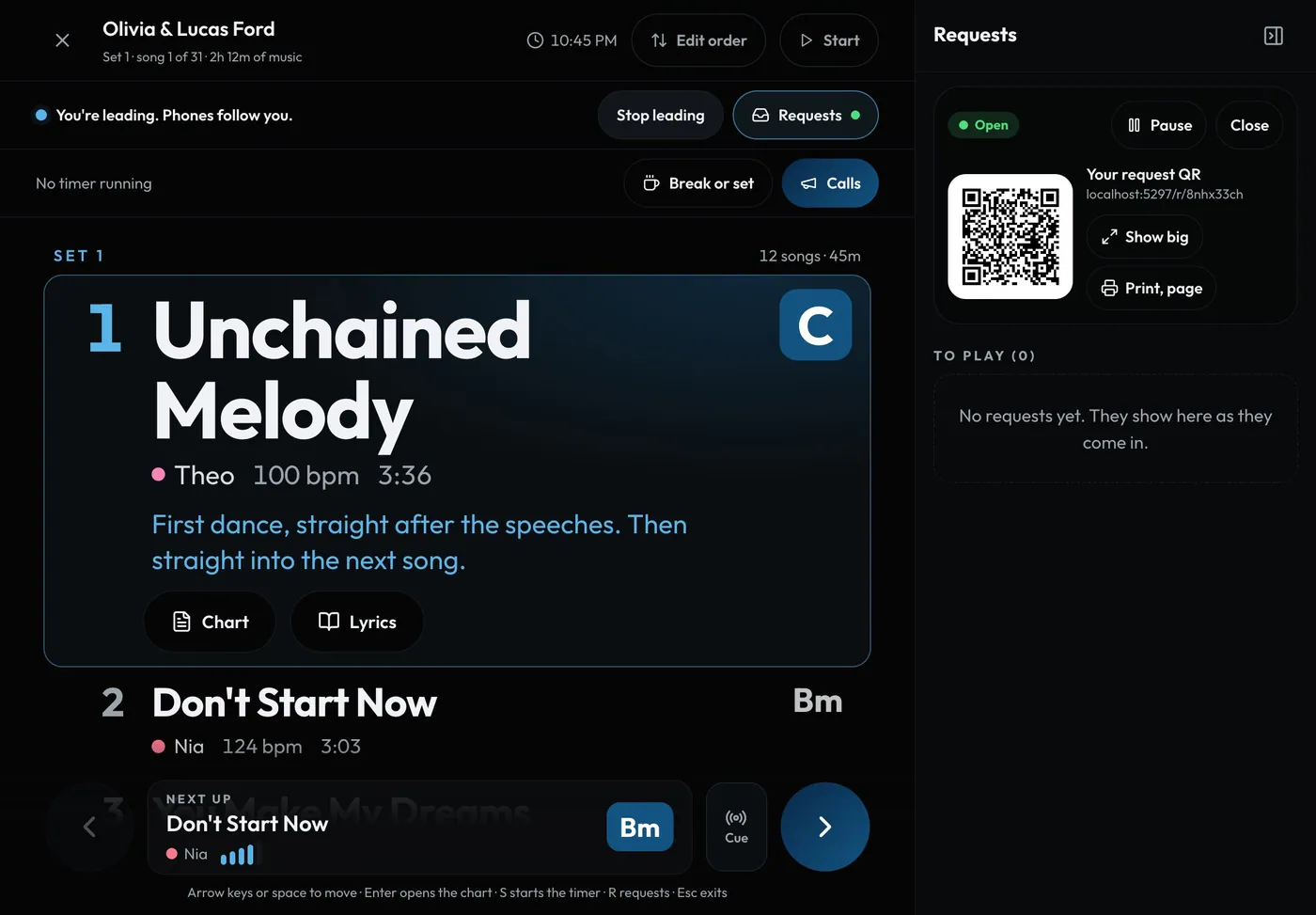
Swipe sideways to see the whole screen. Tap a number for its tip.
- RequestsGuest requests beside the stage. R hides or shows them.
- Lead the showEveryone following jumps when you do.
- Now playingBig title, singer, tempo and key.
- CueLine up any song as next.
- Next upTap the arrow for the next song.
How to
- Open a show and tap Stage, or Stage view on the gig or in a show's ... menu in Studio > Shows.
- One person taps Lead the show; everyone else follows automatically.
- Tap the big arrow, or press Space, for the next song.
- Tap Cue to line up a different song as Next up.
- Tap Edit order to move, skip or bring back songs mid-show.
- Leaders and setlist editors see guest requests beside the stage on an iPad held sideways or a computer, or behind the badge above the controls on a phone (see Guest requests on the night).
Tip
Tip
Want to look ahead without dragging everyone along? Tap Break away, then Back to live when you're ready.