In the demo · EveryoneFor everyone
Capo, another key, and the song's key
Read the chart the way you play. Numbers or chord names, with a capo or for a horn, and play the whole song in another key when the singer needs it.
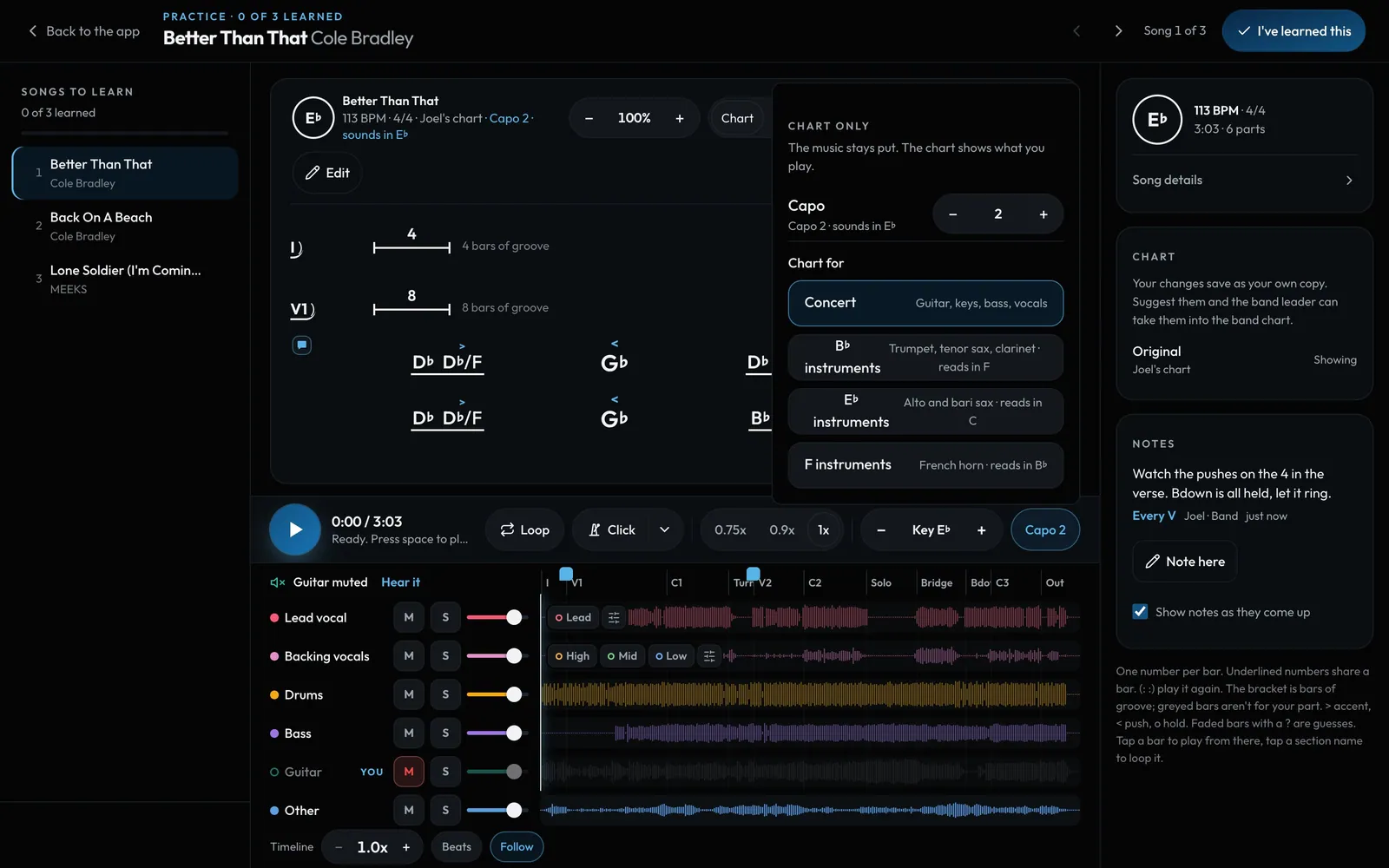
Swipe sideways to see the whole screen. Tap a number for its tip.
- The song's keyFix a wrong key: names stay, numbers are redone.
- CapoThe chart shows the shapes you play. The music stays put.
- HornsTrumpet, tenor and clarinet read in their own key. Alto and bari too.
- Play in this keyMoves the music and the chart together.
How to
- Numbers shows the Nashville numbers, Names shows the chords in the key.
- Capo is for the chart only: pick the fret and the chart shows the shapes you play ("Capo 2, sounds in E♭").
- Playing a horn? Pick B♭ instruments, E♭ instruments or F instruments and the names are written for you.
- Key − and + play the whole song in another key, up to 6 steps each way. The chart moves with it.
- Chart written in the wrong key? That's different: tap the round key badge (or Song details → The song's key) and pick the right one. The chord names stay the same and the numbers are worked out again. Keys the app heard are marked Detected or Maybe, and Undo puts it back.
- Your choices are remembered for each song on this device.