Everyone
My profile
Your roster card and how the band reaches you, one section at a time: profile, instruments, notifications, calendar, availability, travel, appearance. The live preview shows exactly how the band sees you.
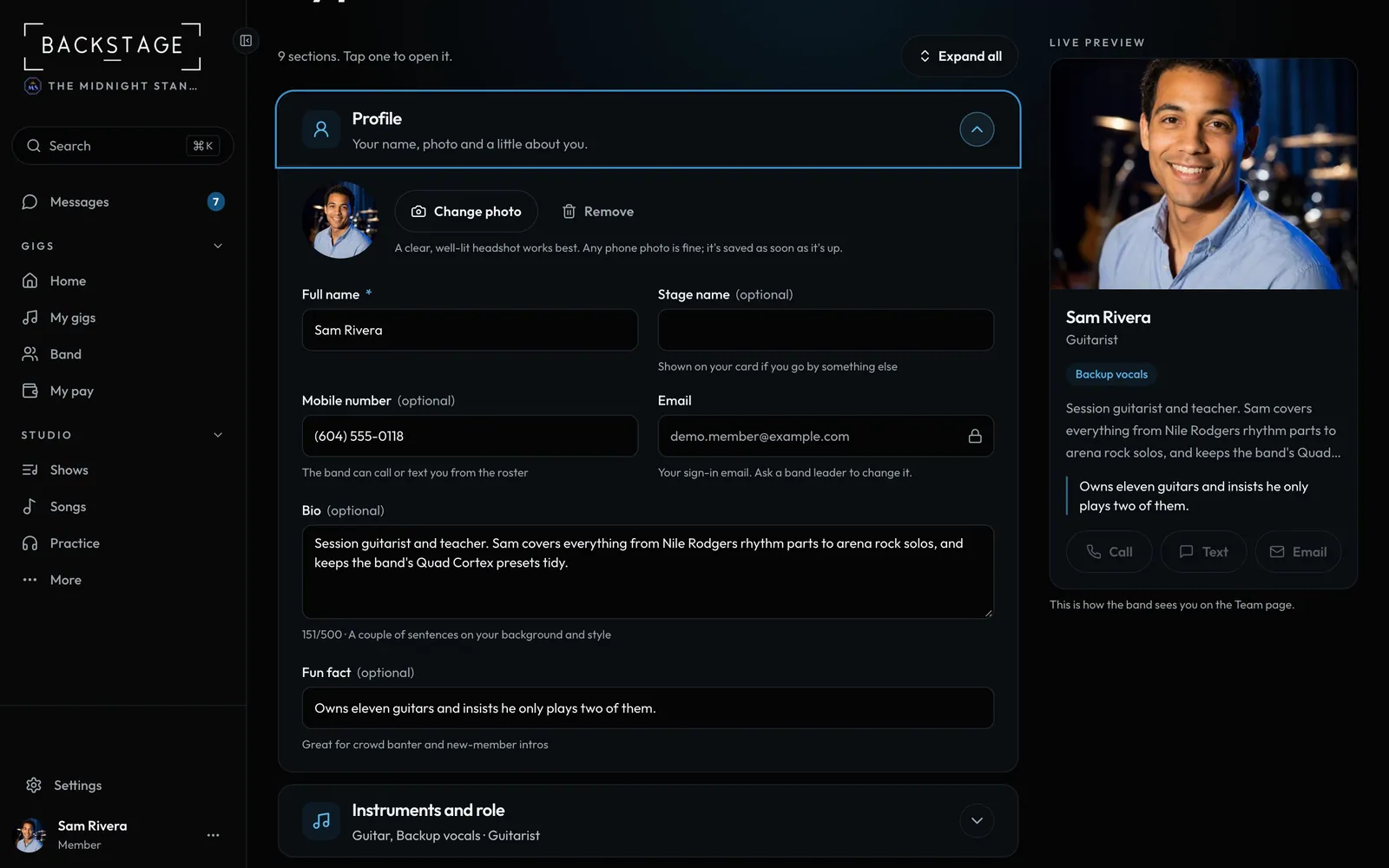
Swipe sideways to see the whole screen. Tap a number for its tip.
- Your photoAny phone photo, HEIC too. It saves as soon as it's up.
- Live previewYour card on the Team page, as you type.
- Bio and fun factA line or two so new players know you.
- One section at a timeEach row says what's set. Tap to open.
How to
- Open My profile from the account menu at the bottom of the sidebar (More on a phone).
- Open Profile and tap Upload photo (or Change photo). You see it straight away with its progress, and it saves on its own: no Save needed for the photo.
- Add your stage name, a bio and a fun fact.
- Open Instruments and role so leaders can find you for the right gigs.
- Open Availability for standing notes, like "Teaches Tuesday evenings". Tap Save changes once for everything you changed.
- My settings (the link at the bottom of My profile) is yours in every band: your profile, instruments and gear, Sub work, availability, travel and how you get paid.
Tip
Tip
Any photo from your phone works, even a big one or an iPhone HEIC. It's made small and turned the right way up on your phone before it uploads, and its location data is dropped.